How to rank higher on Google Maps: A local SEO guide for Christchurch businesses
If you run a local business—whether you’re a plumber in Hornby, a cafe in Riccarton, or a lawyer in the CBD—there is one place you absolutely need to be found: The Google Map Pack.
You know the one. It’s that box of three business listings that appears at the very top of Google when you search for "electrician near me" or "web design Christchurch."
Getting into those top three spots (The "Local Pack") can transform your business. But how do you get there? And why do some businesses rank #1 while others are invisible?
In this guide, we break down the basics of Local SEO and give you 5 actionable steps to climb the rankings in 2026.
What is local SEO?
Local SEO (Search Engine Optimisation) is the process of optimising your online presence to attract more business from relevant local searches.
Unlike standard SEO, which focuses on your website ranking globally or nationally, Local SEO focuses on ranking your Google Business Profile (formerly Google My Business) for customers in your specific geographic area.
Why does it matter?
- 46% of all Google searches have "local intent" (e.g., people looking for a service nearby).
- 88% of people who search for a local business on mobile call or visit within 24 hours.
If you aren't in the Map Pack, you are handing those customers straight to your competitors.
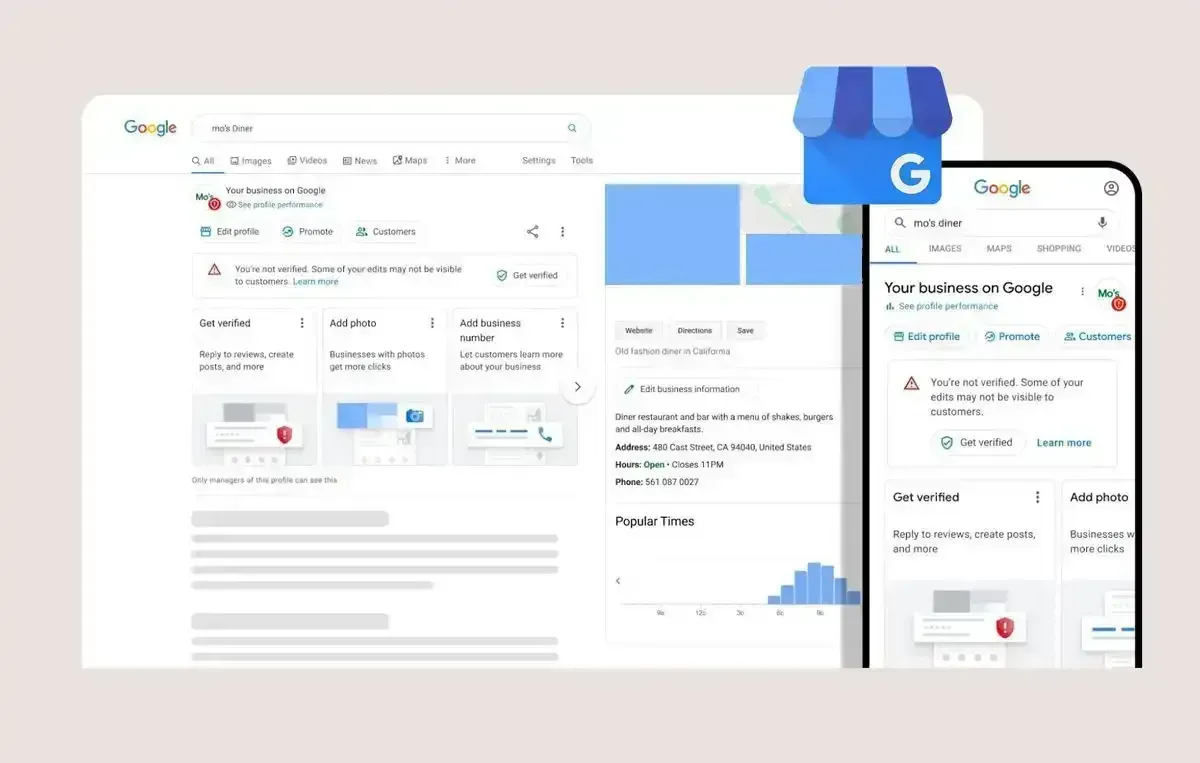
Step 1: Claim and verify your Google Business Profile
This sounds obvious, but you’d be surprised how many Kiwi businesses haven't done it. Your Google Business Profile is the anchor of your local rankings.
- Go to google.com/business.
- Claim your business name.
- Verify it. (Google will usually send a postcard with a code to your physical address to prove you actually exist there).
Tip: Make sure your business name is accurate. Don't stuff keywords like "Best Plumber Christchurch" into your business name if that isn't your legal name—Google will suspend you for this.
Step 2: The "NAP" consistency rule
Google is a robot. It craves consistency. To trust you, it needs to see that your Name, Address, and Phone number (NAP) are identical everywhere online.
If your website says "123 High St" but your Facebook says "123 High Street, Christchurch," Google gets confused.
Action: Check your contact details on:
- Your Website (Footer and Contact page)
- Google Business Profile
- Facebook / Instagram / LinkedIn
- Local Directories (Yellow, Finda, Neighbourly)
Ensure they match perfectly.
Step 3: Get more 5-Star reviews (and reply to them!)
Reviews are one of the strongest ranking signals for Local SEO. Google wants to recommend the "best" business, and it uses review count and score to decide who that is.
Don't just wait for reviews—ask for them. Send a follow-up email to every happy client with a direct link to your Google review form.
Crucial Step: Reply to every review.
- Good review: "Thanks, Sarah! Glad we could help get the heating sorted."
- Bad review: "Hi Mark, sorry to hear this. Please call us so we can fix it."
Replying shows Google (and future customers) that you are active and care about your reputation.

Step 4: Add "local content" to your website
Your Google Business Profile doesn't exist in a vacuum; it is connected to your website. If your website mentions "Christchurch" and the specific services you offer, it helps your Map listing rank higher.
Ideas for local content:
- Create a "Service Area" page listing the suburbs you cover (e.g., "Servicing Merivale, Cashmere, and Halswell").
- Mention your city in your page titles (e.g., "Heat Pump Installation Christchurch").
- Embed a Google Map on your Contact page.
Step 5: Post regular updates
Did you know you can post on Google just like Facebook?
Google Business "Updates" allow you to post photos of recent jobs, special offers, or company news. These expire after 6 months, but posting weekly signals to Google that you are open and active.
What to post:
- "Just finished a renovation in Sumner!" (Photo of work)
- "We are open all through the school holidays."
- "Check out our new winter special."
Is Local SEO too time-consuming?
If managing citations, replying to reviews, and updating directory listings sounds like a headache, you aren't alone.
At Digital Presence, we specialise in Local SEO for Christchurch businesses. We handle the technical optimisation, the content, and the monthly management to get you moving up the map rankings.
Want to know where you stand? We can run a quick audit of your local visibility.
[Book a free chat with Simon] to discuss your rankings.
Share